Design a Comment System
When we iterate over the ith row to find the number of ones, we can also find and add the number of ones/zeroes for all the columns in that row. Therefore, we could avoid repeated iteration by precomputing the number of ones and zeroes in each row and column.Practice this problem
=======================
Design a comment system, such as Disqus, is a feature integrated into websites that allows users to post comments on published content, interact with other users through replies, upvote or downvote comments, and sort or filter comments. This system must be robust, scalable, and efficient to handle a large volume of users and comments.
Overview
The behavior of comments on social media and content platforms, such as YouTube, perfectly illustrates the delicate balance between maintaining real-time accuracy and ensuring quick system responses. Have you ever noticed that after posting a comment on a YouTube video, it sometimes doesn't appear immediately when you view the video from a different account or in an incognito mode? This occurs because, for many platforms, comments aren't seen as urgent. Therefore, they use a method called "eventual consistency," which might delay the display of some comments to all users instantly.
In this example, we will apply our system design template. If you're interested in a hands-on approach, you can also explore our code demonstration to better understand how eventual consistency functions in practice.
Functional Requirements
- User Authentication: Users can create an account, log in, and log out. This requires a secure authentication system that can handle 100M Daily Active Users.
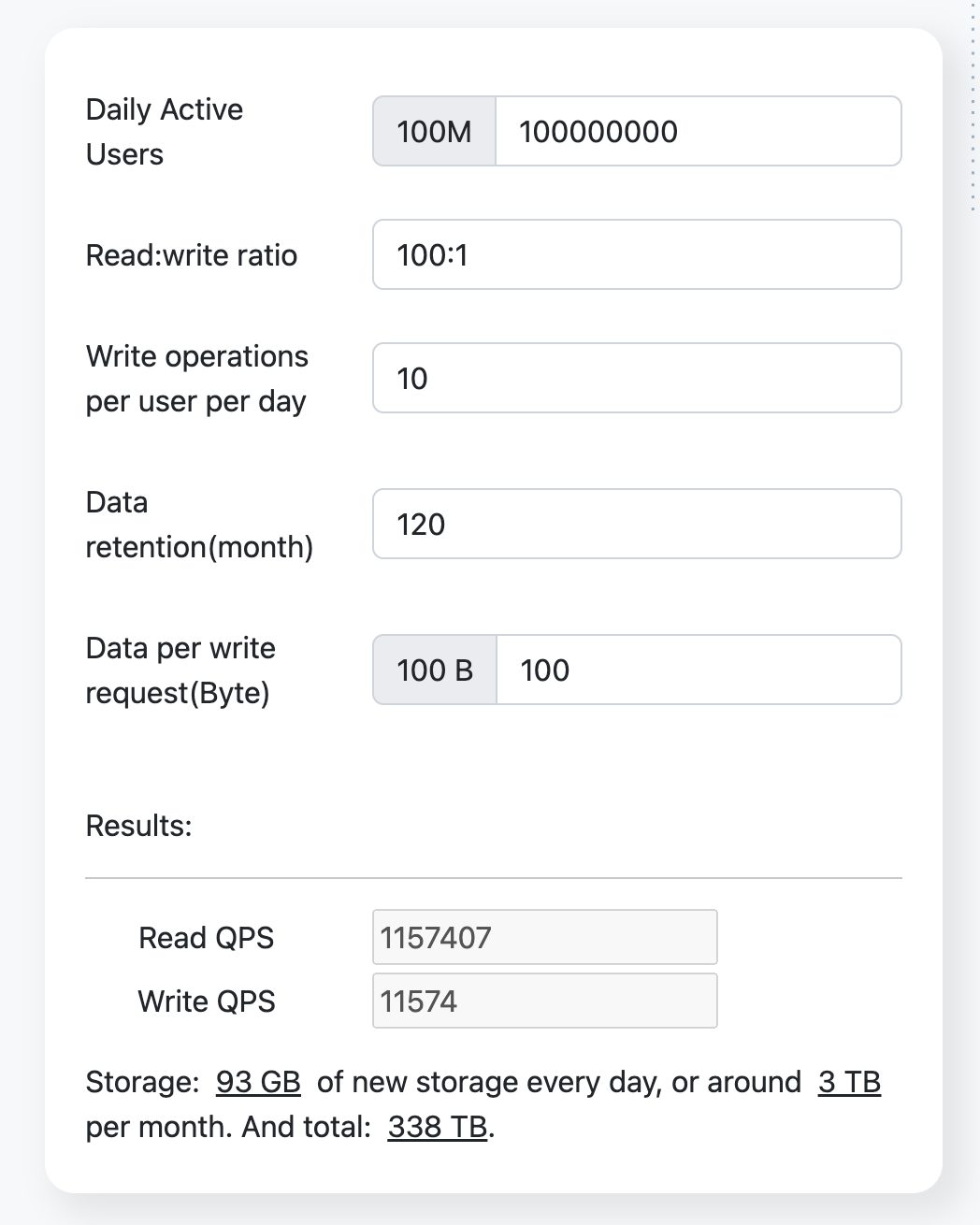
- Comment Submission and Display: Users can submit comments, which are then stored in a database and displayed under the related content. Assuming each user posts 10 comments every day, and each comment is 100 bytes, the system needs to handle 1 billion comments daily.
- Replying to Comments: Users can reply to other comments, with replies nested under the original comment. This requires a system that can handle complex data relationships.
- Upvote or Downvote Comments: Users can upvote or downvote comments. This requires a system that can track and update the vote count for each comment in real-time.
- Moderation Tools: Administrators can delete inappropriate comments or ban users. This requires a robust administration system that can handle a large volume of moderation actions.
Non-Functional Requirements
- Scalability: The system needs to support 100M Daily Active Users and handle 1 billion comments posted daily.
- Reliability: The system must ensure data integrity and error handling.
- Availability: The system must be operational when needed, using techniques like replication to avoid downtime.
- Consistency: Allow for brief inconsistencies in the system within a few seconds, but the system will reach consistency afterwards (eventual consistency).
- Latency: The system must have low latency to provide a smooth user experience.
- Efficiency: The system must minimize redundant operations and optimize resource usage.
Resource Estimation
Assuming a read:write ratio of 100:1.
Using the resource estimator, we get the following results:
API Endpoint Design
The system will feature API endpoints designed for submitting and displaying comments, responding to comments, and utilizing moderation tools. Each of these endpoints will have a specific request and response format.
-
POST /commentRequest body:
{ "content": "" // the content of comment }Response body:
{ "status": "success" | "failed", "message": "", // string "comment": { "id": "generated_id", "content": "the-content-of-the-content", "posterId": "the-user-id-of-poster", "posterName": "The display name of poster", "postTime": "2022-01-01T12:00:00Z" } } -
GET /{topic_id}/comments?cursor={last_timestamp}&size={size}: This API endpoint returns data sorted in descending order, from the most recent to the oldest.Path variables: The variable
topic_idis typically associated with a specific page in a one-to-one relationship. By inputting the relevant 'topic_id' of the page, you can retrieve the comments related to that page.Request Parameters:
last_timestamp: This parameter is used to query the timestamp of the last comment from the previous list. If you're retrieving data from the first page, this parameter should not be set.size: This parameter determines the number of lists retrieved at once. The default value is 20, but it can be set to a maximum of 50.
Response body:
  "status": "success" | "failed",
  "total": 12345, // The total count of comments of the specified topic.
  "data": [ // If there are no comments, then this is an empty array.
    {
			"id": "the-id-of-the-comment",
      "content": "The content of comment",
      "posterId": "the-user-id-of-poster",
			"posterName": "The display name of poster",
			"postTime": "2022-01-01T12:00:00Z",
      "upvoteCount": 123,
      "downvoteCount": 12,
			"repliedCommentId": "the-id-of-replied-comment" | undefined, // If this comment replies to another comment, then this field points to the commented comment.
    },
		...
  ]
}``` -
POST /comment/{comment_id}/replyPath variables: comment_id, the id of replied comment.
Request body:
{ "content": "" // the content of comment }Response body:
{ "status": "success" | "failed", "message": "", // string "comment": { "id": "generated_id", "content": "the-content-of-the-content", "posterId": "the-user-id-of-poster", "posterName": "The display name of poster", "postTime": "2022-01-01T12:00:00Z", "repliedCommentId": "the-id-of-replied-comment" } } -
PUT /comment/{comment_id}/upvotePath variables: comment_id, the upvoted comment id.
Response body:
{ "status": "success" | "failed", "message": "", // string } -
PUT /comment/{comment_id}/downvotePath variables: comment_id, the downvoted comment id.
Response body:
{ "status": "success" | "failed", "message": "", // string } -
DELETE /admin/comment/{comment_id}Path variables: comment_id, the ID of the comment to be deleted.
Response body:
{ "status": "success" | "failed", "message": "", // string }
High-Level Design
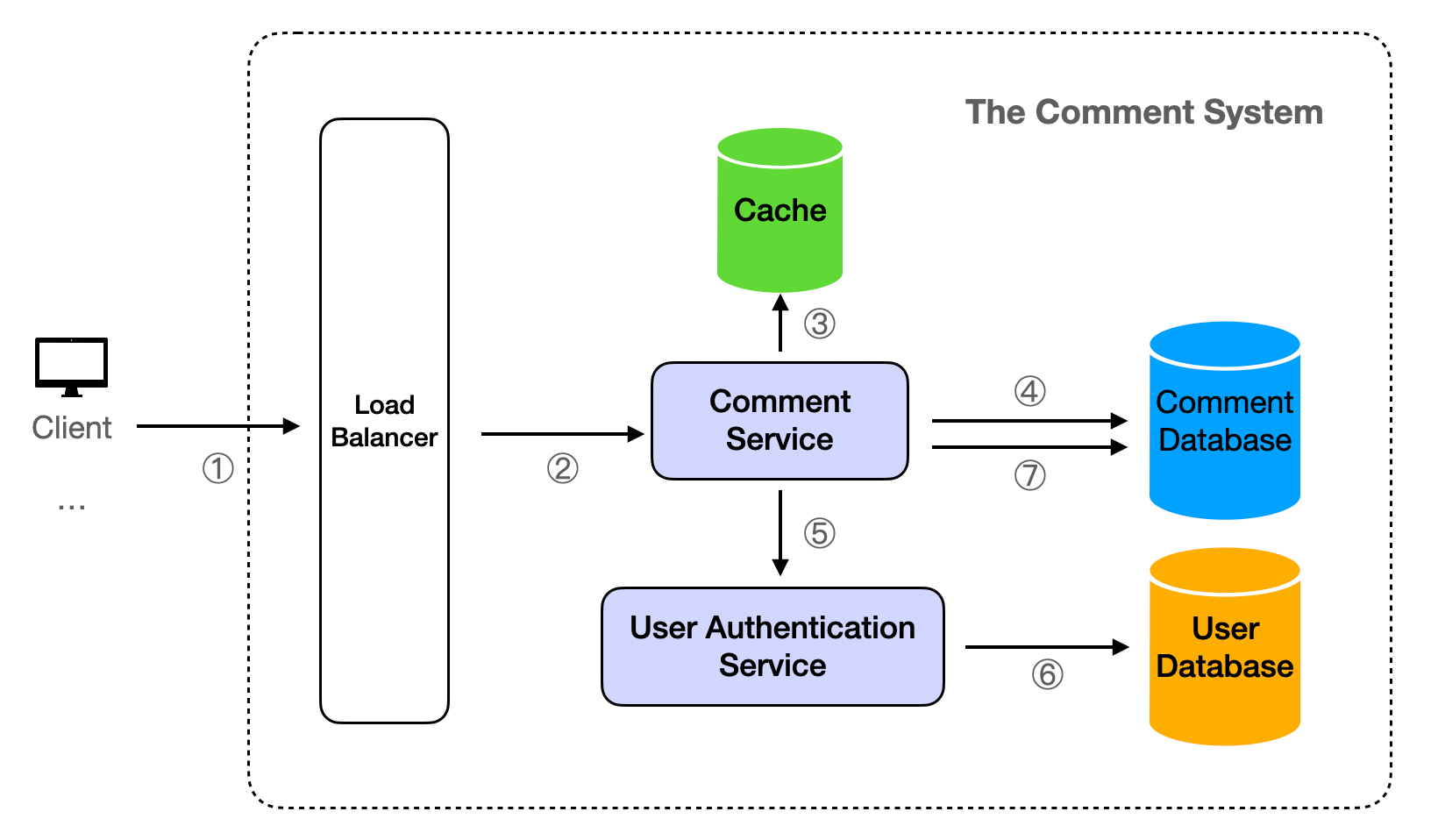
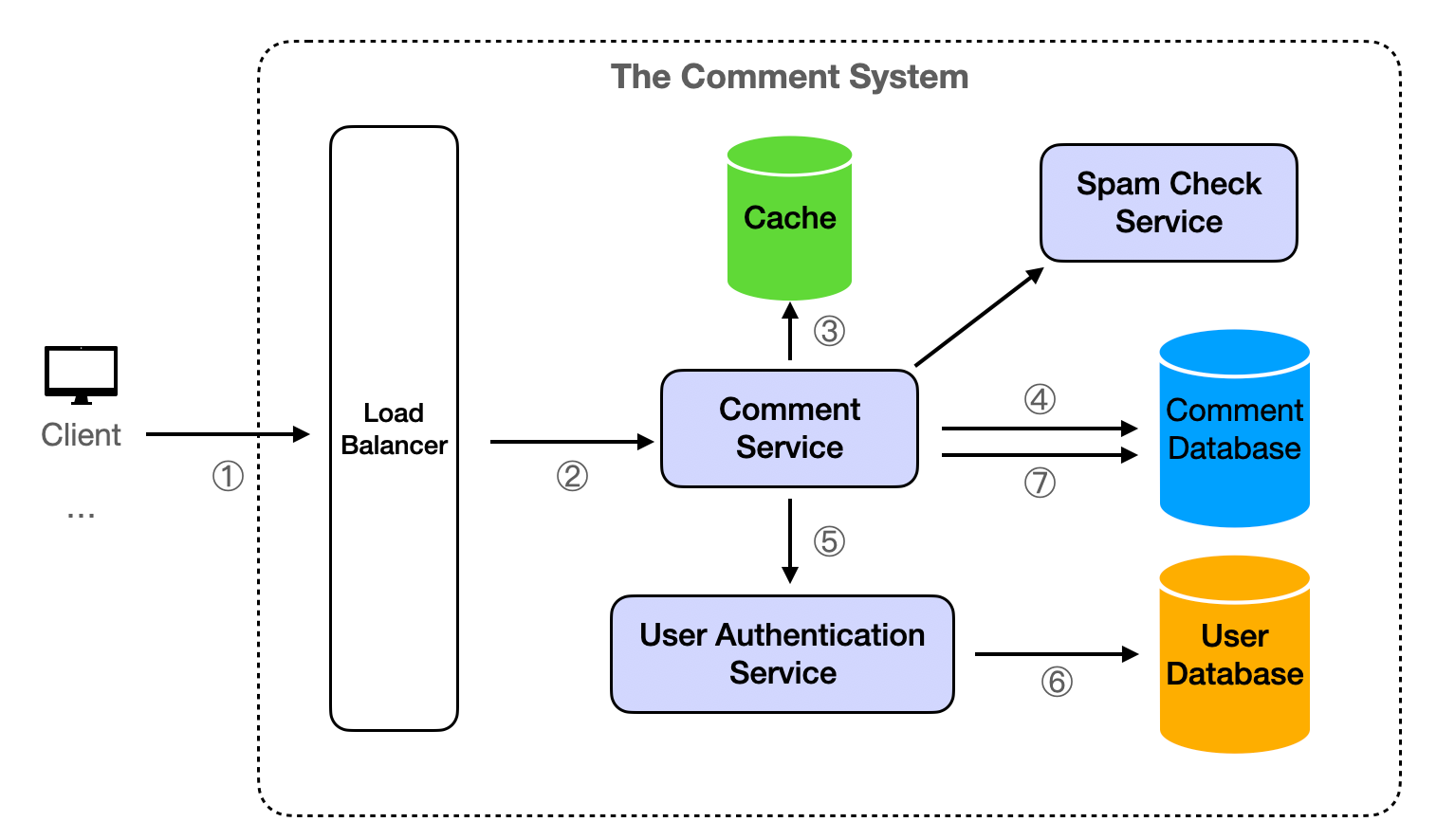
The Comment Service is designed to execute essential business operations using a stateless approach. This design allows for easy cluster expansion deployment, making it an ideal solution for handling high levels of concurrency.
- The client sends a request to the server.
- Upon receiving a request, the server first directs it through a load balancer before it reaches the Comment Service. This ensures efficient distribution of network traffic.
- For retrieval operations, the Comment Service initially attempts to fetch data from the Cache. If successful, the data is read directly from the Cache.
- If the Cache does not contain the requested data, the Comment Service then queries the Comment Database. The result is subsequently returned to the client and simultaneously written back into the cache for future reference.
- Write operations require an initial request to the User Authentication Service to validate permissions. This step ensures that only authorized users can modify data.
- If the user does not have the necessary permissions (for instance, if they are not logged in), the request is denied and the client is notified.
- Once the user's permissions have been verified and approved, modifications can be made to the Comment Database. This process ensures the integrity and security of the data within the system.
Detailed Design
Data Store
Database Type
We propose using either SQL or NoSQL databases for the Comment Database, with a preference for NoSQL databases due to their high performance, high availability, and easy scalability. For the purpose of this demonstration, we will use MongoDB, a popular NoSQL database.
For the User Database, we recommend using a Relational Database Management System (RDBMS) such as PostgreSQL or MySQL. These databases are adept at handling structured data and offer strong consistency, a critical factor for user authentication.
Data Schema
The Comment Database will comprise topics, comments, upvotes and downvotes collections. The topics collection will include the following fields:
{ "_id": ObjectId("..."), "topic_id": "the-topic-id", "total_count": 12345, // The total count of comments of the topic. }
The comments collection as below:
{ "_id": ObjectId("..."), // as comment_id "content": "The content of comment", "user_id": "user_id", // indexed "topic_id": "topic_id", // indexed "replied_comment_id": "", "upvote_count": 123, "downvote_count": 12, "timestamp": ISODate("...") }
The upvotes collection as below:
{ "_id": ObjectId("..."), "topic_id": "topic_id", "comment_id": "comment_id", // indexed "user_id": "user_id", // indexed "timestamp": ISODate("...") }
The downvotes collection as follows:
{ "_id": ObjectId("..."), "topic_id": "topic_id", "comment_id": "comment_id", // indexed "user_id": "user_id", // indexed "timestamp": ISODate("...") }
The User Database will have a users table with fields as below:
| Filed name | Data type |
|---|---|
| user_id | string |
| username | string |
| role | "admin" or "normal" |
The user fields unrelated to Comment are not listed.
Database Partitioning
To handle the large volume of data, we can use horizontal partitioning (sharding). We can shard the comments, upvotes and downvotes collections by topic_id. This way, data modification operations, such as upvotes and downvotes, are transactionally controlled on a single partition, with data from different topics spread across multiple nodes, reducing the load on each node and improving performance.
For more detailed content, refer to Partitioning (Sharding).
Database Replication
To ensure high availability and data durability, we can use database replication. Each write operation is performed on the primary database and then replicated to one or more secondary databases. If the primary database fails, one of the secondary databases can take over.
MongoDB supports replication natively through a feature called replica sets. A replica set is a group of MongoDB processes that maintain the same data set. The primary node receives all write operations, and all other nodes are secondary nodes that replicate the primary node's data set.
If the primary node fails, an election determines the new primary node. This replication process ensures that your data is safe and that your system remains available even if a node fails. It also allows you to scale out your system by adding more secondary nodes to handle read operations.
By default, MongoDB reads and writes are on the primary node. We can set the read preference of the MongoDB client to "secondary", so that the read operations of the MongoDB client will be executed on the secondary node. The advantage is that it can reduce the read pressure on the read node. The disadvantage is that it may read outdated data, because the secondary node may not have time to replicate the latest data on the primary node. However, the Comment System does not require strong consistency, as long as eventual consistency can be ensured.
Data Retention and Cleanup
Based on the requirement for 10 years of data retention, we need to implement a data cleanup strategy.
Indeed, MongoDB supports Time-To-Live (TTL) indexes. TTL indexes are a special type of MongoDB index that can be used to automatically delete expired data from the database. We can set a TTL index on the date field, and MongoDB will automatically delete expired documents. This is very useful for dealing with data that has some natural expiration time (such as logs, data collection, etc.).
For example, if we need to specify to delete comments over 10 years old from the comments collection, then the command is as follows:
use commentDatabaseName; // Specify comments database name db.comments.createIndex( { "timestamp": 1 }, { expireAfterSeconds: 315360000 } )
In this command, first use the use command to select your database, then create a TTL index for the timestamp field on the comments collection.
Cache
To improve read performance and reduce the pressure of reading on the database, we can use a cache like Redis.
Comments related to a specific topic typically don't change often. Therefore, after each database query, the data can be stored in the cache with a time-to-live (ttl) set for a few seconds. This approach ensures that if the client requests the same content within the ttl timeframe, the Comment Service will retrieve the data from the cache, eliminating the need for a database query. Once the ttl duration expires, the cache is cleared and the database is queried again.
For additional information on caching, please refer to our article on Caching.
Analytics
To track user behavior and system performance, we can use an analytics system like Google Analytics or a custom-built analytics system. The analytics system can track various metrics such as:
- User Behavior Metrics: Number of comments posted, number of upvotes/downvotes, number of replies, etc. This can help us understand user engagement and identify popular topics.
- System Performance Metrics: Response time, error rates, cache hit/miss ratio, etc. This can help us identify bottlenecks and optimize system performance.
- Business Metrics: Daily active users, user growth rate, user retention rate, etc. This can help us understand business performance and guide business decisions.
The analytics data can be stored in a separate analytics database, which can be a column-oriented database like Redshift or BigQuery that is optimized for analytics queries.
We can also use real-time analytics tools like Apache Kafka or Amazon Kinesis to process and analyze data in real-time. This can provide instant insights and enable real-time decision making.
Follow up detailed design questions and answers
How to cache pagination data?
The interface GET /{topic_id}/comments?cursor={last_timestamp}&size={size} is utilized to paginate the comment queries for a specific topic. The results of these queries are stored in the cache, using a combination of topic_id, last_timestamp, and size as the key. The format is as follows:
{topic_id}:{last_timestamp}:{size} {topic_id}:{0}:{size} # Set to 0 when last_timestamp is not available
For instance:
`example-topic1:1692278954682:20
Here, topic_id is "example-topic1"
last_timestamp is "1692278954682"
size is "20"`
When retrieving data from the cache, we can directly query based on the request parameters.
If we need to clear the cache for a specific topic, we can locate and delete based on the first part of the key, which is the topic_id.
How to avoid duplicate data when switching page?
This issue discusses the problem that arises when new data is inserted while a client is viewing paginated data, leading to duplicate data at the intersection of two pages.
To illustrate, imagine a page is currently loading data 1-20 from the database, with the 20th piece of data being T. If a new piece of data is added to the database, and the page requests to load the next set of data (21-40), a problem arises. Given that the interface sorts by timestamp in descending order, the 21st piece of data provided by the database is T (the 20th piece of data on the previous page), which appears as a duplicate from the page's viewpoint.
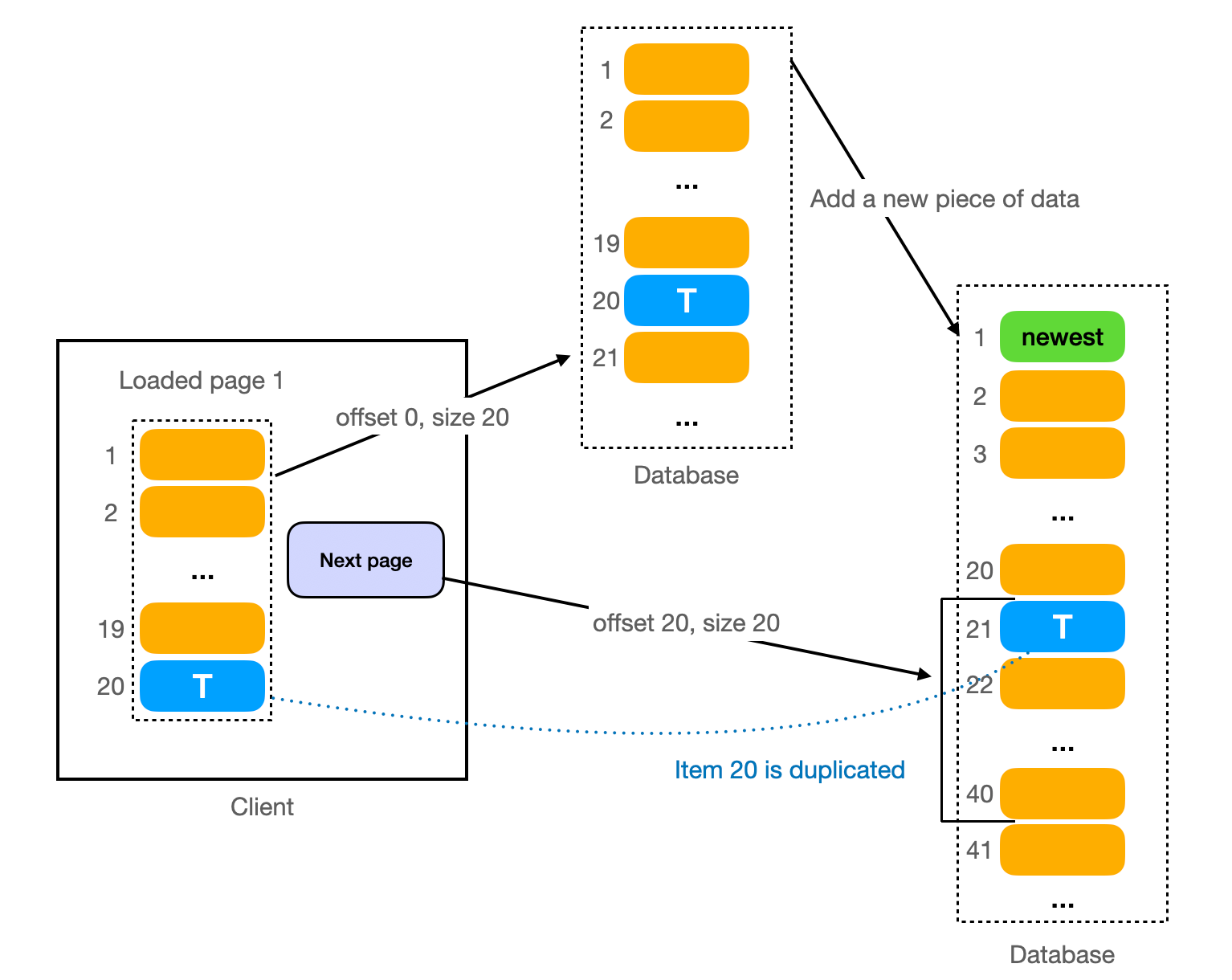
However, this issue is effectively avoided in the design of the GET /{topic_id}/comments?cursor={last_timestamp}&size={size} interface. Here, last_timestamp is used instead of offset. The backend service only queries data where timestamp < last_timestamp each time, preventing the occurrence of duplicate data.
How to handle peak traffic?
Handling peak traffic is a common challenge for any large-scale system. Here are some strategies to handle peak traffic:
-
Queueing: Queueing is a technique used to manage high traffic loads on a server. When the server receives more requests than it can handle at once, instead of rejecting the excess requests, it places them in a queue. The server then processes these requests in the order they were received as resources become available. This helps to prevent the server from becoming overwhelmed and crashing under heavy load. It also ensures that all requests are eventually processed, although some may experience a delay.
A practical way to implement queueing is by using a Message Queue. Message queues provide an asynchronous communications protocol, meaning that the sender and receiver of the message do not need to interact with the message queue at the same time. Examples of message queue services include Apache Kafka, RabbitMQ, and Amazon SQS. These services allow you to enhance the overall resilience of the system.
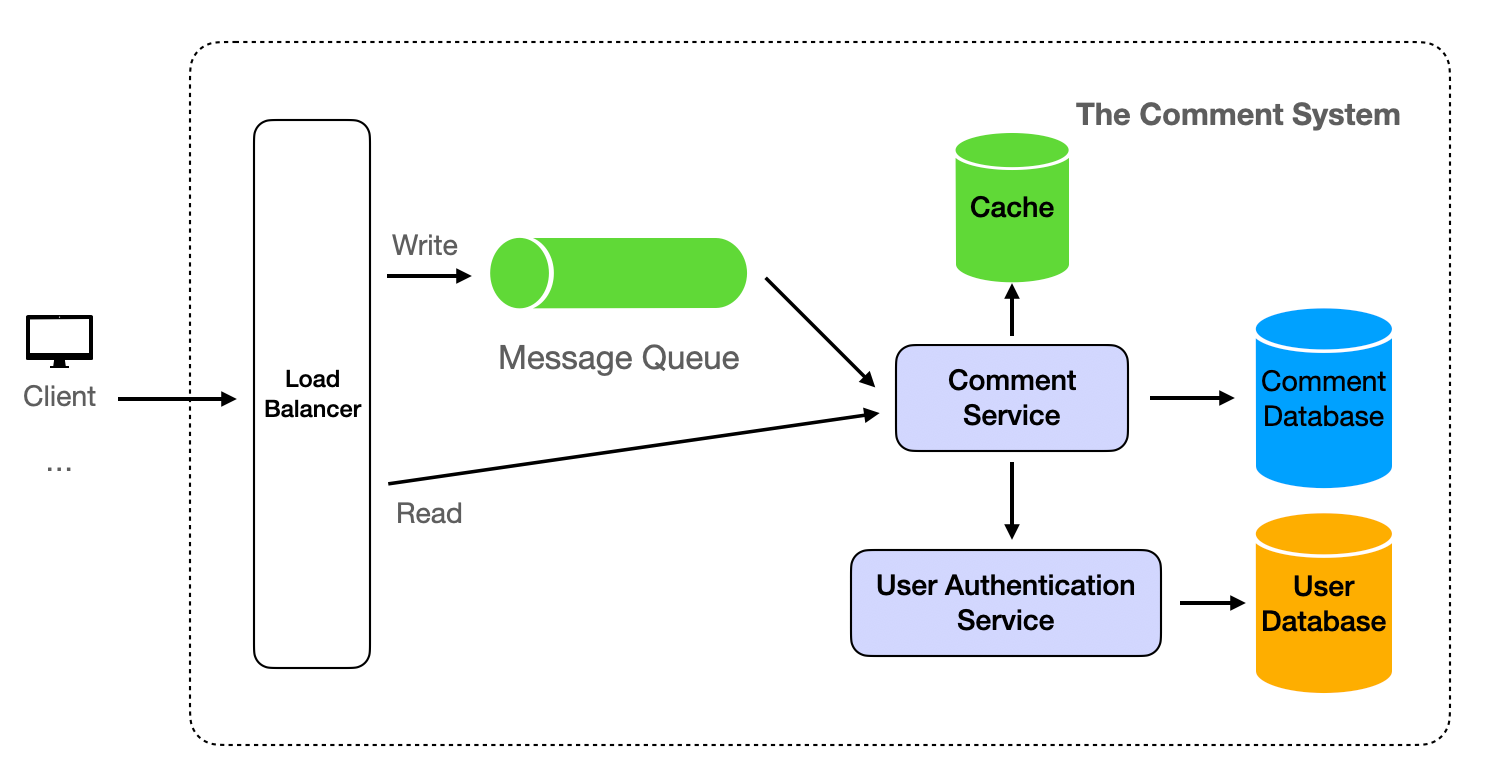
Explore the application of Message Queue in system design by referring to our detailed guide on Template Instantiation: Social Media Comments.
-
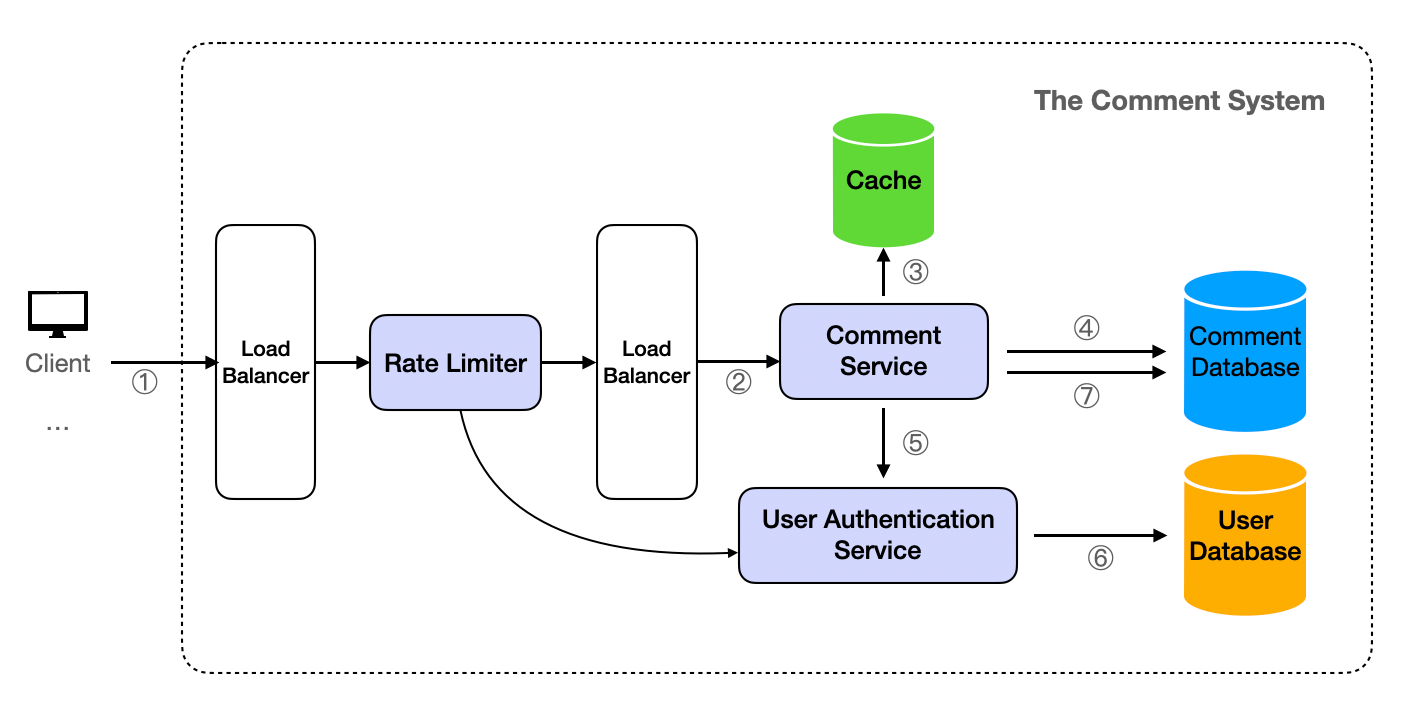
Rate Limiting & Throttling: Rate limiting is the process of controlling the rate at which a user can make a request to the server. This can prevent any single user or client from overloading the server with a high number of requests. Throttling is a method of controlling the rate at which a user can make requests to the server. It sets a limit on how many requests a user or IP address can send to the server within a certain period of time.
For basic rules like limiting the frequency of requests based on IP addresses, platforms such as Cloudflare offer support. However, for more intricate rate limit logic, for instance, allowing varying access frequencies for different membership levels, a custom implementation is required. This can be achieved by developing a Rate Limiter Service. Depending on the specific requirements, it might be necessary to integrate with a User Authentication Service. Given the need for high concurrency and high availability, the Rate Limiter Service should be deployed in a cluster. In this setup, incoming requests to the server are first routed through the Load Balancer to the Rate Limiter, and then forwarded to the Comment Service via the Load Balancer, as depicted in the subsequent diagram.
Other than these, there also the typical standard way of scaling:
-
Auto-scaling: Auto-scaling is a cloud computing feature that allows users to automatically scale cloud services like server capacities up or down, based on defined situations such as traffic load. This can be done both at the server level and at the database level. For example, if the system is deployed on AWS, we can use AWS Auto Scaling to automatically adjust the number of EC2 instances, and Amazon RDS to automatically adjust the capacity of the database.
-
Autoscaling Load Balancing: Autoscaling Load balancing is the process of automatically adjusting the capacity of a load balancer to distribute network traffic efficiently across multiple servers. This ensures no single server bears too much demand. It works by monitoring the load on the servers and scaling the capacity up or down as needed. This ensures the system continues to run smoothly and efficiently.
-
Caching: Caching can significantly reduce the load on the database by storing the result of a request and reusing it for subsequent requests. This is especially effective for read-heavy workloads and can greatly improve the system's ability to handle peak traffic.
-
And, it's important to monitor the system closely, especially during expected periods of peak traffic, to ensure that these measures are working effectively and to make adjustments as necessary.
How to handle spam comments?
We can use a spam detection system that uses machine learning algorithms to identify and block spam comments. The system can be trained with a dataset of spam and non-spam comments. It can also use features like the frequency of comments from the same user, the content of the comment, etc.
In the existing layout, the Spam Check can be integrated as an independent service, with the addition of a spam_comments collection to the Comment Database. When there are new comments, the Comment Service initially contacts the Spam Check Service for verification. If the comments are identified as spam, they are not saved in the comments collection, but rather in the spam_comments collection. An interface can be created for the data in the spam_comments collection, allowing administrators to review, label them as non-spam and move them to the comments collection.